TL;DR
- A screenshot is a picture, not a payment. The only proof is the credit in your own bank or UPI app — match the amount, time and 12-digit UTR there.
- Fakes come in five shapes: edited screenshots, fake payment apps, fake bank SMS, the "I paid extra, please refund" trick, and a QR code sent to you to "receive" money. You never scan a QR or enter your UPI PIN to receive money.
- Already lost money? Call 1930, file at cybercrime.gov.in, tell your bank, and keep the chat and the UTR.
- Selling in Instagram DMs? ViralDM sends a UPI pay button inside the DM and checks every screenshot that comes back. It cannot see your bank account, so by default a screenshot that looks right waits for your one-tap Approve.
- Disclosure: we make ViralDM. The checklist works without it, and every outside fact links to its source, dated.
Every Instagram seller in India knows the moment. Someone asks the price, you send your UPI ID, and a Google Pay screenshot lands in the chat with a green tick. Usually it is real. Sometimes it is an edited image, a screen from a fake payment app, or the first move of a refund scam — and by the time you notice, the course link or the parcel has gone.
One founder building for these sellers described them on LinkedIn in January 2026 as "still matching UPI screenshots at 11 PM". This guide covers how to check a screenshot yourself, and how to stop doing it by hand when you sell in DMs.
How fake UPI payment screenshots work
None of these tricks break UPI: every debit still needs the payer's UPI PIN, which NPCI describes as the passcode that authorises every bank transaction. They work on the person being paid.
1. The edited screenshot
An old genuine receipt, or a template, with a new amount, time or name typed over it. Moneycontrol's personal-finance team wrote on 6 August 2026 that one can be made within minutes, and that the giveaways are small: an incomplete transaction number, a slightly different font, digits that do not line up, a time that does not match.
2. The fake payment app
Spoof apps look like Google Pay or PhonePe and show a payment-successful screen, sometimes with the sound, without moving any money — Razorpay's guide to the scam (11 February 2026) describes them. The screen belongs to the payer's phone, so it shows whatever the payer wants.
3. The fake bank SMS
A credit alert that is just a text message. In a case reported by the Times of India in May 2024, a Bengaluru tech entrepreneur got two credit alerts while a caller claimed he had sent ₹30,000 instead of ₹3,000 and wanted the rest back; the alerts came from an ordinary 10-digit mobile number. Razorpay's guide adds that sender names can be spoofed too.
4. The overpayment refund
The buyer says they sent more than the price and asks for the difference back, quickly, often to another UPI ID. Tralata, a sweets brand taking orders for mithai gift boxes from an Instagram post, described exactly this on LinkedIn in August 2024: the screenshot looked legitimate, and nothing had been credited. If you refund, the only real payment is yours.
5. The QR code that "receives" money
NPCI's fraud-awareness page describes scammers who answer sellers' social-media posts, offer to buy without much bargaining, then send a QR code and ask the seller to scan it and enter their UPI PIN — first for a small amount they return to look genuine, then for a larger one. Scanning and entering your PIN always sends money; NPCI's rule is that the PIN is entered only for payments, never for receipts.
One more case is not a fake at all: a genuine payment to someone else. A buyer pays a friend's QR and forwards that real receipt. Amount, UTR and time look perfect; only the payee is wrong.
How to check a UPI payment screenshot: a 10-point checklist
- Open your own bank or UPI app and find the credit. Not the buyer's screenshot — Moneycontrol, Razorpay and NPCI all point to your own app.
- Do not treat an SMS as proof. A real alert comes from your bank's registered sender name, not a 10-digit number — and even then, confirm in the app.
- Match the amount to the rupee. ₹499 and ₹449 look alike at a glance.
- Match the UTR. Every UPI payment has a unique 12-digit reference number, and the sender and the receiver see the same one (Paytm, updated July 2026). Search your own history for it. A short or cut-off UTR is a red flag.
- Match the time. The screenshot's time should sit close to the credit in your app. Yesterday's screenshot is a reused screenshot.
- Check the payee. The receipt should show your UPI ID or your bank account name.
- Look at the details, but do not stop there. Mismatched fonts and uneven digits are warning signs; a clean-looking screenshot proves nothing, because spoof apps make clean screenshots.
- Slow down when you are rushed. "The bank server is slow, please send it now" is a classic line. A genuine buyer can wait a minute.
- Never refund an overpayment from a screenshot. If nothing extra arrived, there is nothing to refund. If an unexpected credit really is there, ask your bank how to return it instead of paying a new UPI ID.
- Never scan a QR code or enter your UPI PIN to receive money, and install payment apps only from the official app stores. NPCI's fraud-awareness page covers both.
In Hinglish the question is usually typed as "fake upi payment screenshot kaise pehchane". The answer is the same ten points, and the first one does most of the work.
What to do if you were scammed
- Call 1930 as soon as you can — the helpline that the government's cybercrime portal lists for any victim of financial cyber fraud.
- File a complaint at cybercrime.gov.in, the Home Ministry's National Cyber Crime Reporting Portal.
- Tell your bank, using the number in its own app or website. NPCI advises reporting only to your bank or the police.
- Keep everything: the chat, the buyer's handle, the fake screenshot, the UTR it showed and the times. Do not post transaction details publicly; NPCI lists that as a don't.
- Report the account on Instagram, so the same profile cannot move on to the next seller.
If money you received is later called fraud
Sometimes real money arrives but came from a scam victim, and your account gets restricted. The Week explained the rules on 25 September 2026: ask your bank for the disputed amount, the complaint reference and the exact restriction, send a written grievance, and keep a trail — the statement entry with amount, UTR and time, plus invoices or delivery records. It also reports a 2026 Karnataka High Court case in which a bank could not freeze a whole account when the police direction covered only ₹25,000.
How to stop checking screenshots by hand
The checklist works, but at twenty orders a day it eats an evening. If your sales happen in Instagram DMs, ViralDM runs the same checks inside the chat:
- Add your UPI ID and switch on UPI Verify. The UPI ID goes under Profile, the switch is on the Payments page. Every screenshot is checked against that UPI ID.
- Put a pay button in the DM. Add a UPI pay block to an automation — say, the comment-to-DM that answers "price?" — or ask your AI assistant to make one with
create_pay_link. The buyer gets a link for that exact amount, which opens your UPI QR and a "Pay in any UPI app" button. - The buyer pays with any UPI app. The money goes straight to your own UPI ID; ViralDM keeps 0% of it.
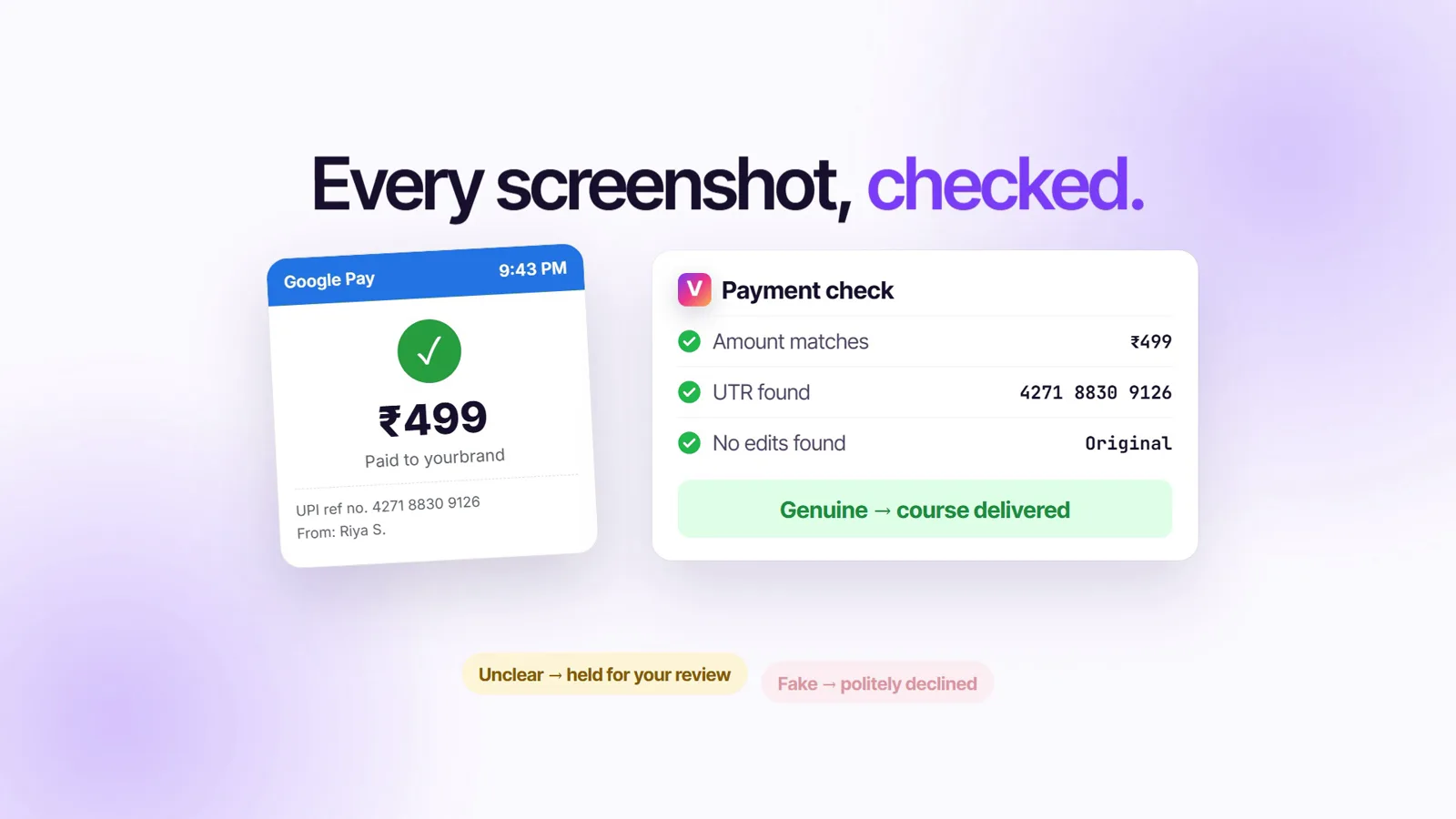
- The screenshot comes back into the same chat and is checked. The amount must match the order, the payee must be your UPI ID or name, the UTR must be present and never used before, the payment must be recent, and the image must show no signs of editing.
- You get a verdict; the buyer gets a polite answer. Looks right: you are told to check your bank app and tap Approve, and the product goes out at once. Unclear: held for your review while the buyer hears the payment is being verified. Fake: politely declined with a request for the correct screenshot — never the word "fraud".
What the check cannot do
It reads the screenshot; it cannot see your bank account. An edited receipt with the right amount, your UPI ID, the current time and a made-up UTR can pass every check that reads pixels, which is why delivering on the screenshot alone is off by default. You can switch it on for low-priced products; even then, by default a single sale above ₹5,000 or a day above ₹20,000 waits for you. For anything valuable, look at your bank app before you tap Approve.
ViralDM's MCP server for Claude and ChatGPT (Growth plan and above) follows the same rule: list_orders is read-only and cannot mark an order paid, because only the creator, looking at their own bank account, can confirm money arrived. list_payment_verifications lists every screenshot with its verdict and UTR, and generate_evidence_pack builds a dispute PDF with the DM transcript, consent record, verification proof and a SHA-256 hash.
Want payments confirmed without anyone looking? Connect your own Razorpay on the Payments page: Razorpay confirms each payment to ViralDM and the product goes out with no screenshot, with Razorpay's fees. The automatic screenshot check is on Starter and above; on Free you confirm each screenshot with one tap. See pricing and UPI payment verification in the DM.
Payment links, creator stores or screenshots: the options compared
The other answer is a checkout: the buyer pays on a payment page, and the page confirms the payment instead of a picture. That is more certain, and it costs a fee on every sale.
| Option | Where the buyer pays | How the payment is confirmed | Fee on each sale | When the money reaches you |
|---|---|---|---|---|
| ViralDM | UPI QR and Pay button sent inside the Instagram DM | Screenshot checked automatically (amount, your UPI ID, UTR, editing); you tap Approve, or switch on auto-delivery | 0% commission (plan fee only; Free plan available) | Instantly, in your own UPI ID |
| Manual screenshot check | Your UPI ID or QR, shared by hand | You open your bank app for every order | 0% | Instantly, in your own UPI ID |
| Razorpay Payment Links | A Razorpay payment page, from a link you send | Razorpay confirms it; no screenshot | 2% + GST platform fee, standard UPI included; their page offers 0% for the first 90 days after sign-up | Standard T+2 settlement |
| SuperProfile | SuperProfile's checkout (UPI, cards, netbanking); their AutoDM can send the link | Their checkout confirms it | 5% + GST platform fee on Indian accounts; selling needs a paid plan (₹99 the first month, then ₹499 a month) | Next day (T+1) |
| Cosmofeed | Cosmofeed's checkout page | Their checkout confirms it | 10% + GST platform fee, gateway fees included | Next day (T+1) |
| Topmate | Your Topmate profile or link | Not on their pricing page | 10% on sales through your profile or link; 20% on marketplace sales | Not on their pricing page |
Read on 14 October 2026 from each company's own pages: Razorpay's pricing page; SuperProfile's India pricing page, help centre (updated 16 July 2026) and India selling guide; Cosmofeed's help centre; Topmate's pricing page. Where a page did not say something, the table says so.
Where the others are ahead: a checkout confirms the money itself, and Razorpay and SuperProfile take cards and netbanking too; SuperProfile also comes with a link-in-bio store. Where ViralDM is different: the sale stays inside the DM where the question was asked, the money lands in your own UPI ID at once with no cut, and you can still add your own Razorpay for confirmed payments. More: SuperProfile vs ViralDM, Cosmofeed vs ViralDM, and the 9 best Instagram auto DM tools in India.
Frequently asked questions
How can I check if a UPI payment screenshot is fake?
Do not judge the image. Open your own bank or UPI app, find the credit, and match the amount, the 12-digit UTR, the time and the payee. Only your own account shows whether money arrived.
Is there a free fake payment screenshot checker?
The free check that is conclusive is your own bank app. Tools that analyse the image — ViralDM's included — can catch a wrong amount, a missing or reused UTR, a payment to someone else or visible editing, but none can see your bank account. On ViralDM's Free plan you confirm screenshots with one tap; the automatic check starts on Starter, free for the first 30 days.
How do I spot a fake UPI app?
Usually you cannot from the outside: spoof apps copy the look, the tick and even the sound of real ones. Check for the credit in your own app before handing anything over, and install payment apps only from official app stores.
Is UPI payment safe?
UPI itself is secure: every debit needs the payer's UPI PIN, and NPCI notes your bank will never ask for it. The risk is social engineering. Two rules cover most of it: you never need a PIN or a QR scan to receive money, and only your own account proves a payment.
What does a real UTR number look like?
For UPI it is a 12-digit number, unique to each payment, and the sender and receiver see the same one. A UTR that appears only on the buyer's screenshot, and not in your history, proves nothing.
A buyer says they paid extra by mistake. Should I refund?
Not from a screenshot or an SMS. If the extra money is not in your account, there is nothing to refund. If an unexpected credit really is there, ask your bank how to return it.
Can my bank account be frozen because a buyer paid with fraud money?
It can be restricted while a complaint is investigated. Ask your bank for the disputed amount and complaint reference, and keep the chat, the statement entry and your delivery record. The Week's explainer of 25 September 2026 covers the grievance steps.
Does ViralDM check my bank account?
No. It reads the screenshot the buyer sends and never sees your bank account, which is why a screenshot that looks right waits for your Approve by default.
Final thoughts
A fake UPI screenshot only works if the screenshot is where you look. Make your own bank app the place you look, run the ten checks, and the common tricks stop working. If the checking has become a nightly chore, let ViralDM take the first pass on every screenshot in your DMs — start on the free plan.