
Home/Tools/Auto DM kaise lagaye
Instagram par Auto DM kaise lagaye — 5 step mein, free
Koi aapki Reel par "LINK" likhe, aur kuch hi second mein link uske DM mein. Bina code, bina password diye.
First month of Starter free, no card. Then code DIWALI50 takes 50% off your first payment.
Overview
Auto DM ka matlab hai: koi aapki Reel ya post par aapka chuna hua keyword comment kare, story ka reply kare ya aapko DM kare — to use apne-aap ek DM chala jata hai. Aapko har comment ka jawab haath se nahi dena padta. ViralDM yeh kaam Meta ki official Instagram API se karta hai, aur Free plan mein DMs ki koi limit nahi hai. Neeche poora setup hai.
Auto DM kya hai, kya free hai aur kya nahi — poori jaankari English mein: Instagram auto DM.
Watch it work
How it works
Auto DM kaise lagaye, in detail
Step 1 — Instagram ko Professional account banayein
Instagram app → Settings → Account type and tools → Switch to professional account → Creator ya Business chunein. Yeh free hai aur 30 second lagte hain. Auto DM sirf Professional account par chalta hai — yeh Instagram ka niyam hai, kisi tool ka nahi.
Step 2 — ViralDM par free account banayein aur Instagram jodein
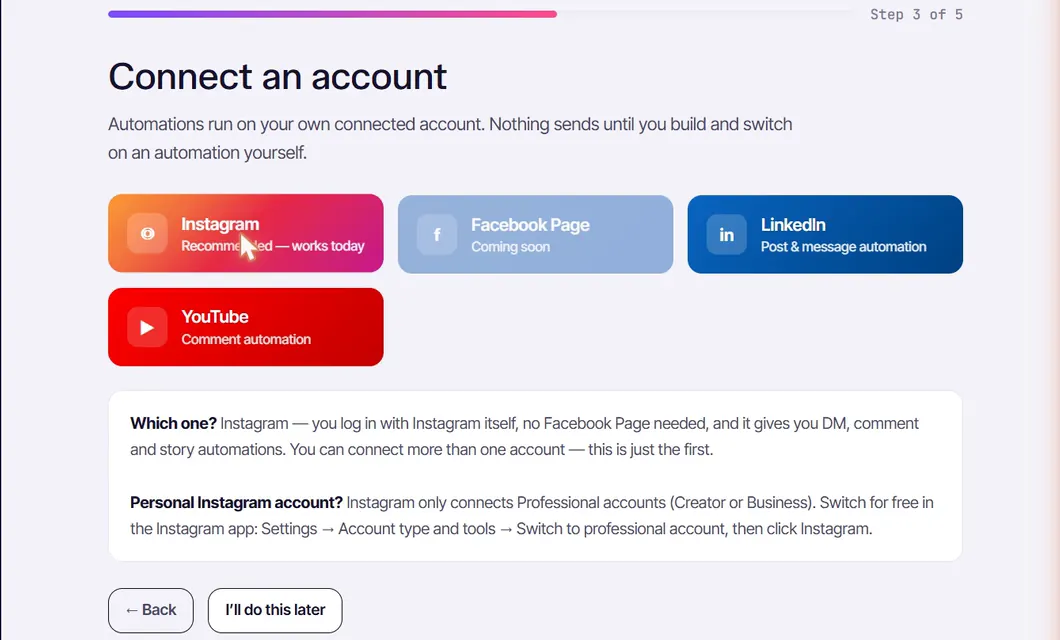
viraldm.app par "Start free" dabayein (Google se bhi sign in ho jata hai). Setup ke "Connect an account" step par Instagram chunein. Login Instagram ki apni screen par hota hai — aapka password ViralDM ke paas nahi aata — aur wahan "Allow" dabate hi account jud jata hai. Pehle 30 din Starter plan free milta hai, card nahi chahiye.
Step 3 — Nayi automation, template se
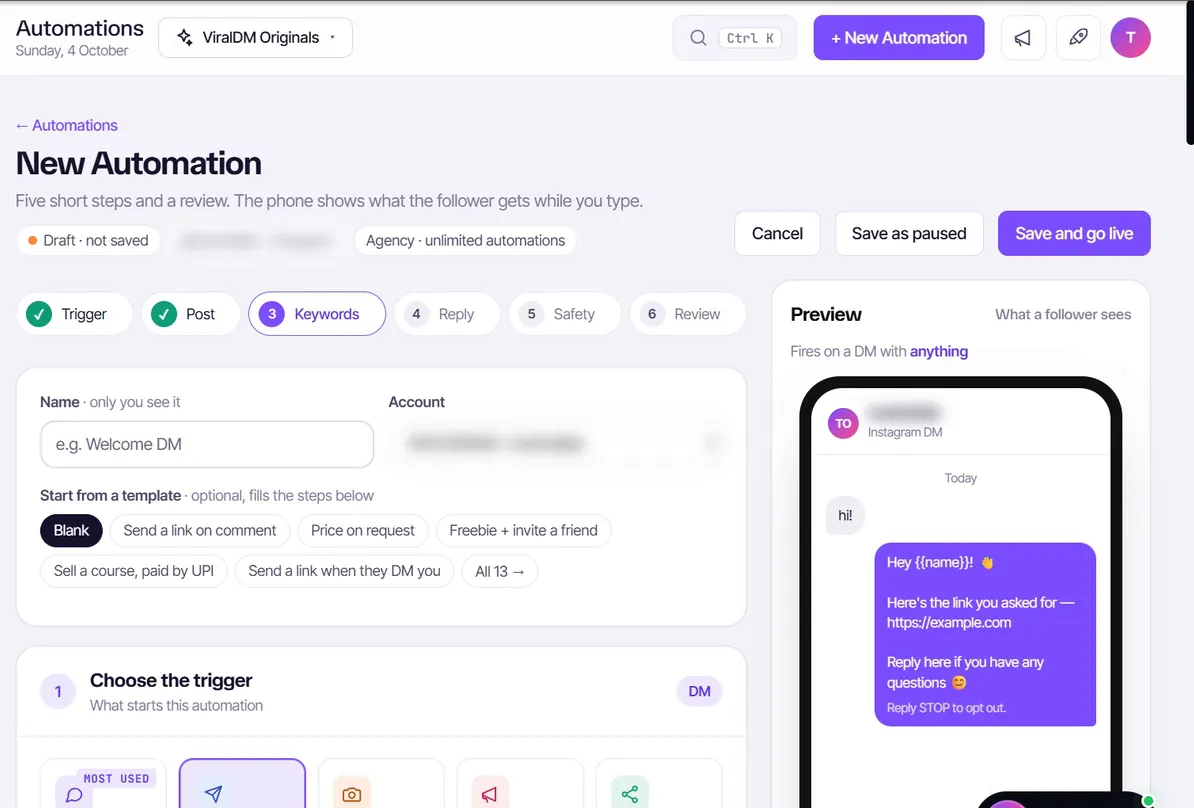
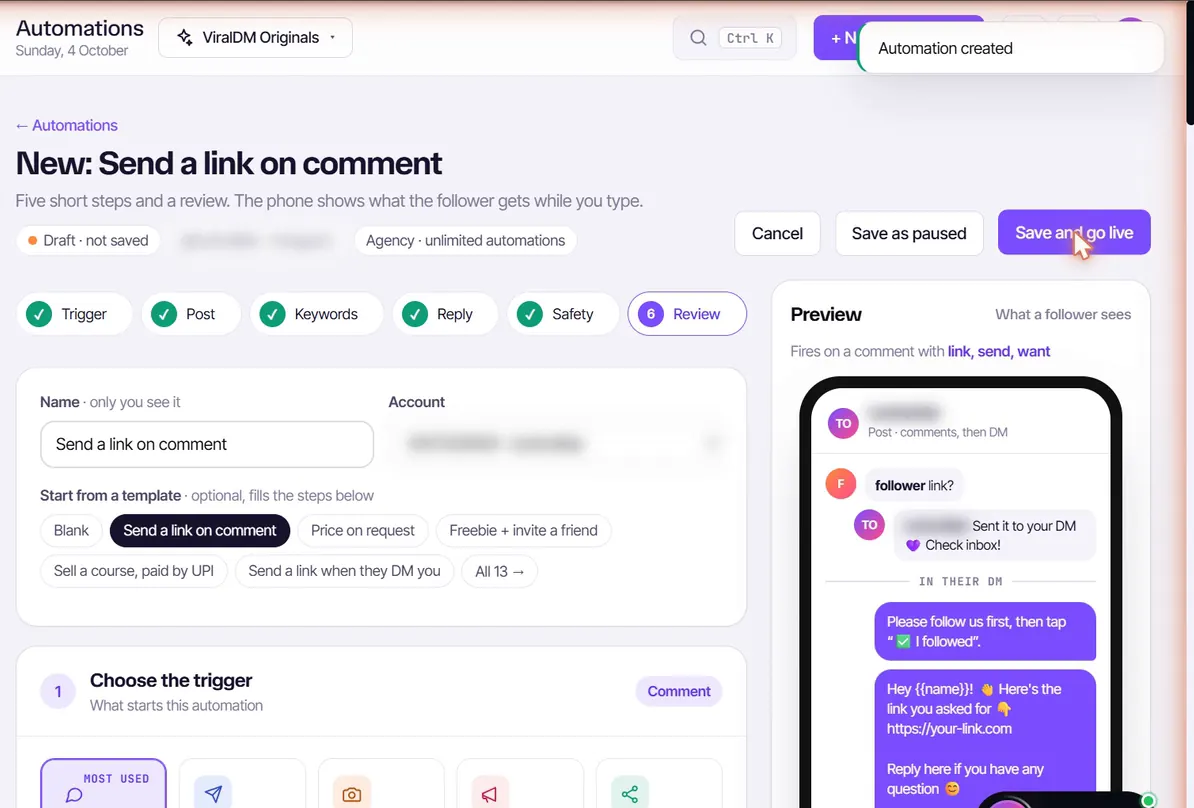
Automations → "+ New Automation". "Start from a template" mein "Send a link on comment" chunein — trigger, reply aur preview apne-aap bhar jaate hain. Trigger comment ka hai (story reply ya DM keyword bhi chun sakte hain). Phir woh Reel ya post chunein jis par chalana hai — jo post abhi schedule hai, woh bhi chun sakte hain.
Step 4 — Keyword aur DM likhein
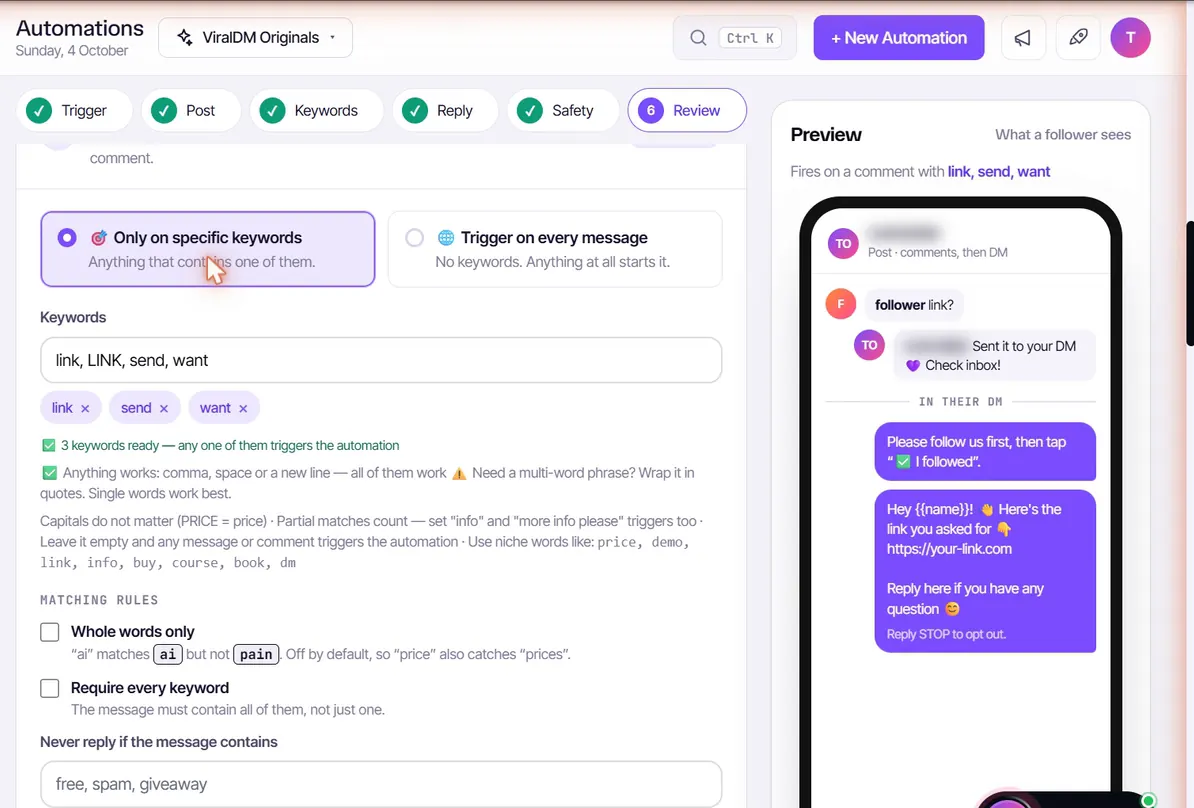
"Only on specific keywords" chunein aur keyword likhein, jaise link, send, want — comma, space ya nayi line, sab chalta hai. Capital letters se fark nahi padta. Phir DM likhein: link, price, ya ek button. Chahein to comment ke neeche chhota sa public reply bhi jaa sakta hai, jaise "Sent it to your DM 💜". Safety step mein pacing pehle se on hota hai.
Step 5 — Save and go live, phir test karein
Review step dekh kar "Save and go live" dabayein ("Save as paused" se baad mein on kar sakte hain). Ab kisi doosre Instagram account se us Reel par keyword comment karein — DM kuch hi second mein aana chahiye. Agar na aaye: keyword ki spelling, sahi post, Professional account, aur Instagram settings mein "Allow access to messages" on hai ya nahi — yeh chaar cheezein dekhein.
Auto DM free hai?
Haan. ViralDM ka Free plan hamesha free hai: DMs ki koi limit nahi, Reels, posts aur story reply par 1 automation, aur 25 leads mahine ke. Zyada automations, 2-3 Instagram accounts aur AI reply (jo follower ki bhasha — Hindi, Hinglish, Tamil wagairah — mein jawab de) ₹499 mahine ke Starter plan mein hain.
Auto DM kya hai?
Instagram par ek automatic message: koi keyword comment kare, story reply kare ya DM kare, to use aapka likha hua DM apne-aap chala jata hai — link, price ya jo bhi aap chahein.
Kya auto DM se account ban hota hai?
Official Instagram API wale tool se nahi, jab tak aap sirf unhi ko DM bhejte hain jinhone pehle comment, story reply ya DM kiya ho. ViralDM Meta App Review mein approved hai aur ek ghante mein 600 reply tak hi bhejta hai (Meta ki limit 750 hai). Jo tool Instagram ka password maange, usse door rahein.
Kya naye followers ko auto DM bhej sakte hain?
Official API se nahi — Instagram kisi bhi app ko follow ki khabar nahi deta. Iske badle followers se keyword comment karwayein ya story reply karwayein; tab auto DM chala jayega.
Kya Hindi ya Hinglish mein reply jayega?
Haan. Aap DM khud Hindi ya Hinglish mein likh sakte hain. Paid plans par AI reply follower ki bhasha pehchaan kar usi mein jawab deta hai — Hindi, Hinglish aur 7 aur Indian bhashaon mein.
Purani post ke comments ko DM ja sakta hai?
Haan, Meta ki limit ke andar: comment ke 7 din tak hi private reply ja sakta hai. ViralDM ka Comment Rewind (Starter plan se) post ke pichhle 7 din ke keyword wale comments ko DM bhej deta hai, dheere-dheere, taaki ek saath burst na lage.
Kya mobile se bhi chala sakte hain?
Haan, viraldm.app phone ke browser mein chalta hai, aur phone ki home screen par app ki tarah install bhi ho jata hai.


Try it on your own account
Your first month is free, no card needed. Then code DIWALI50 takes 50% off your first payment.