
Home/MCP server/Instagram auto DM
Automate Instagram DMs with an AI assistant
Say what you want in plain language — English, Hindi or Hinglish — and your assistant sets up the automation in ViralDM. It is live when the call returns, and you can pause or edit it in the dashboard.
https://mcp.viraldm.app/mcpEvery plan · read-only on Free, read and write from Starter · Full tool list · Last updated 14 October 2026
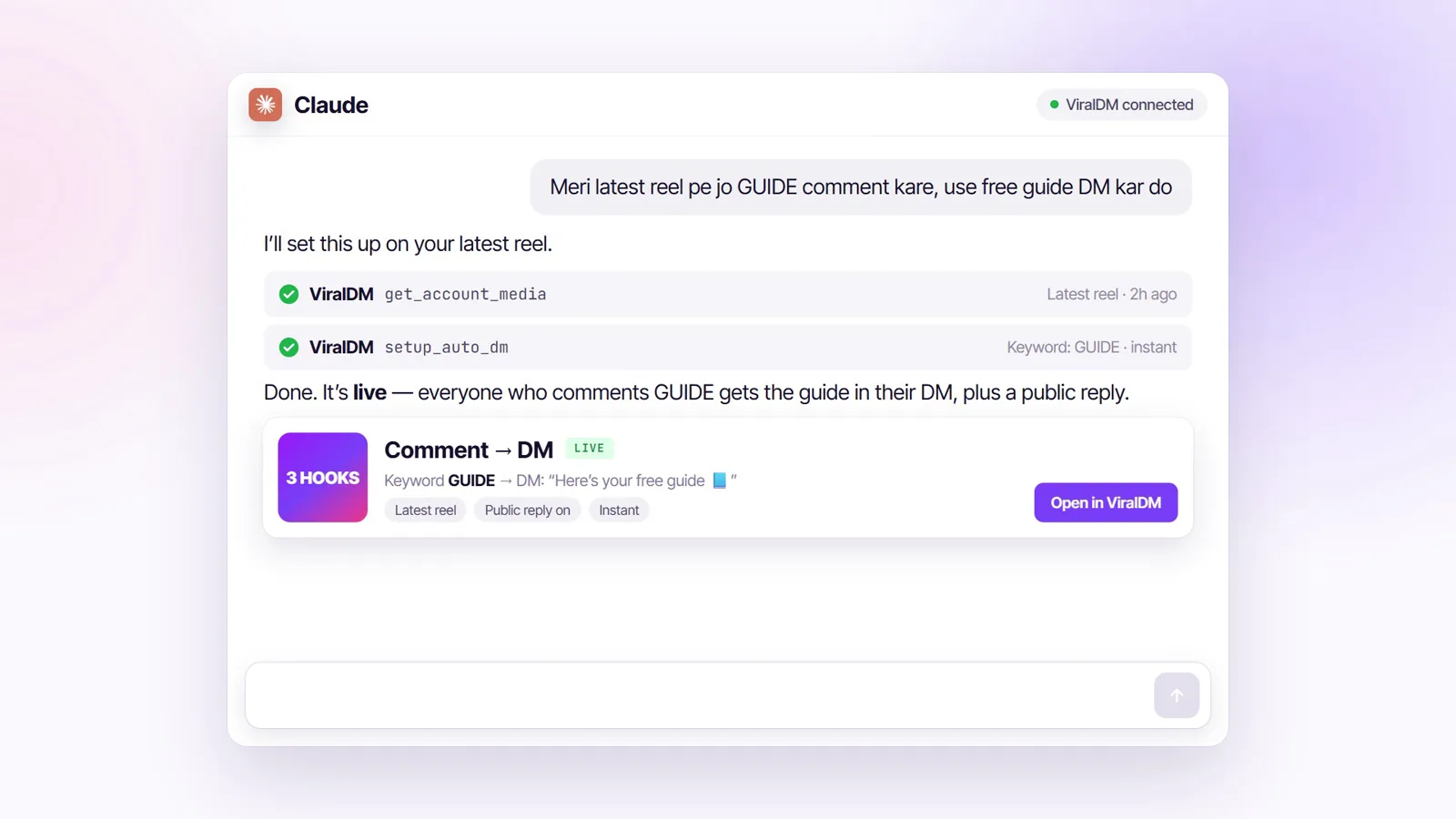
What one sentence can do
- Bind a DM to one reel (post_id), to posts that are still scheduled, to your next post, or to every post whose caption carries a code.
- Add a public reply under the comment (comment_reply) and a delay of 0 minutes for instant DMs.
- Ask for an email or WhatsApp number before the reward (lead_gate), or ask people to follow first (require_follow).
- Answer only people who came from a Click-to-DM ad (ads_only).
- Triggers: comment keyword, DM keyword, any DM, story reply, live comment, post share.
What it will not do
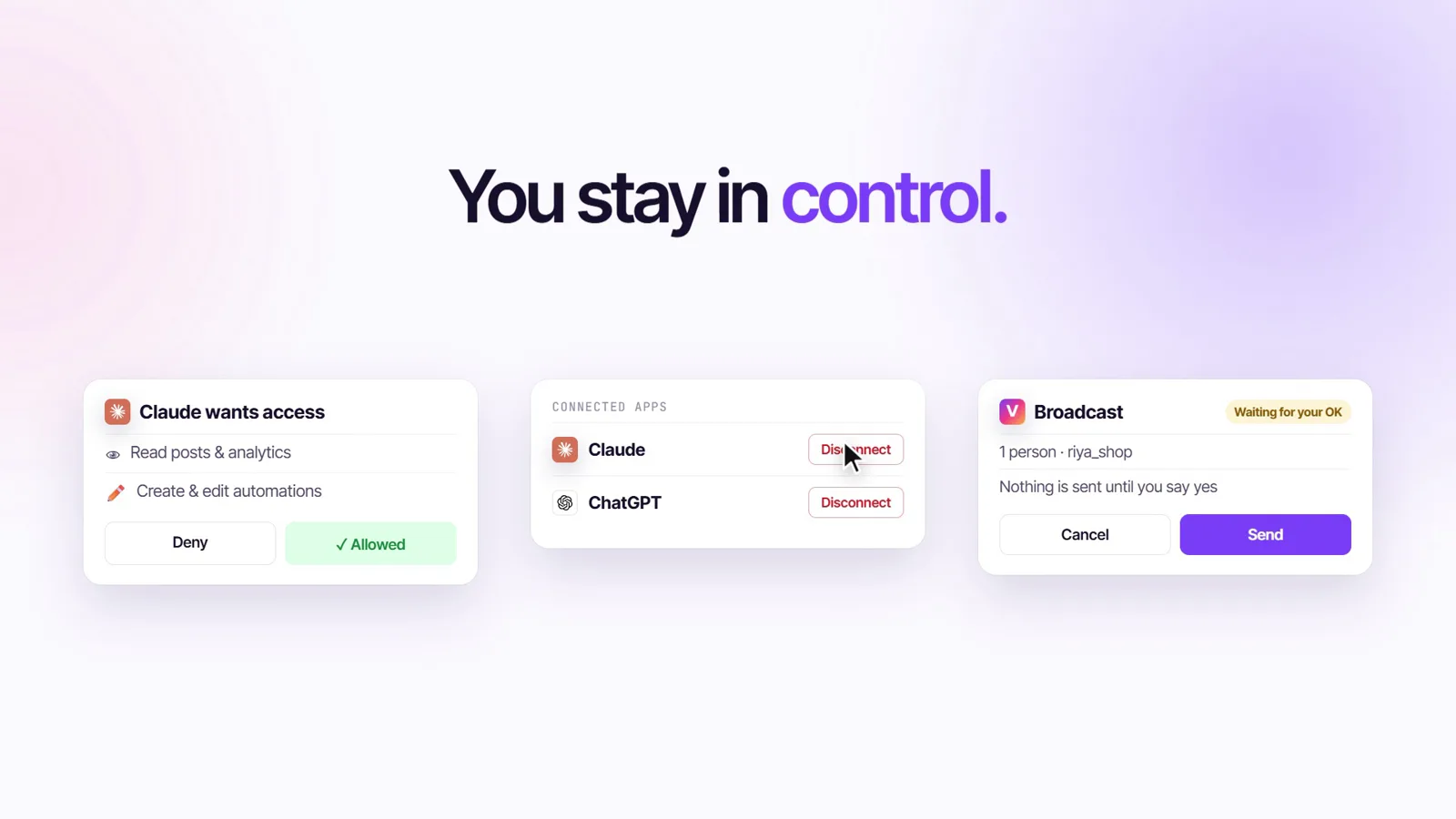
It never DMs someone who has not commented, replied to a story or messaged you — Instagram’s rule. It cannot trigger on new followers or likes: Instagram does not send ViralDM those events. A DM to many people (a broadcast) is drafted first and sent only after you confirm.
Tools used: get_account_media setup_auto_dm manage_sequences manage_dm_templates send_broadcast manage_ab_test
Key facts
The server, in one table
| Server URL | https://mcp.viraldm.app/mcp |
|---|---|
| Transport | Streamable HTTP |
| Sign-in | OAuth 2.1 with PKCE and dynamic client registration, or a personal API key sent as Authorization: Bearer <key> |
| Permissions | Read (mcp:read) and Create & modify (mcp:write), shown on ViralDM’s consent screen before you allow anything |
| Tools | 58: comment-to-DM, DMs, broadcasts, UPI pay links, store, AI Brain, insights, Facebook Page posting |
| Plan | Every plan: read-only on Free, read and write from Starter |
| Turn it off | Security → Connected apps → Disconnect (access ends at once) |
Ideas
What can I ask?
Type it in English, Hindi or Hinglish. Every row is a real ViralDM tool.
| Ask | Tool it runs | Area |
|---|---|---|
| “Set up a DM for everyone who comments LINK on my latest reel, and reply “Sent, check your DM” under the comment.” | get_account_media + setup_auto_dm | Instagram auto DM |
| “Ask for their email before you send the freebie.” | setup_auto_dm (lead_gate) | Lead capture |
| “Reply only to people who come from my Click-to-DM ad.” | setup_auto_dm (ads_only) | Ads |
Sample requests. Instagram publishing, comment and DM tools all work today.
Control
Can an assistant act without asking?
- You connect it on ViralDM’s own consent screen, which shows the app, where access goes, and the two permissions: Read and Create & modify.
- Automations only answer people who commented, replied to a story or messaged you — Instagram’s rule.
- A DM to several people (
send_broadcast) is a draft with a recipient count until it is confirmed. - Disconnect any time: Security → Connected apps → Disconnect.
- The official Instagram API. Your Instagram password never reaches ViralDM.
Does ViralDM have its own MCP server?
Yes. ViralDM builds and runs its own remote MCP server at https://mcp.viraldm.app/mcp, live since May 2026. No Zapier or other bridge is involved.
Is it free?
Yes, MCP works on every plan. On Free your assistant can read your account (automations, subscribers, analytics) but not change anything; from Starter it can create and edit too, and so can it in the free first month. Calling the API directly with a key starts on Growth.
Can the AI DM my followers without asking me?
No. Automations only reply to people who commented, replied to a story or messaged you — Instagram’s rule. A DM to several people is prepared as a draft with a recipient count and is sent only after you confirm it.
Is it safe for my Instagram account?
ViralDM uses Meta’s official Instagram API — your Instagram password never reaches ViralDM, and your ViralDM password never reaches the assistant. Sends are paced, and Surge Guard slows replies down when a reel goes viral.
How do I disconnect an assistant?
In ViralDM go to Security → Connected apps and press Disconnect. Its access ends at once.
Which AI assistants work?
Any assistant that supports remote MCP over HTTP: Claude, ChatGPT (developer mode), Claude Code, OpenAI Codex, Cursor, Gemini CLI and Antigravity, Windsurf (Devin Desktop), VS Code with GitHub Copilot, Perplexity, Notion, Grok, Hermes Agent, n8n, Zed, Cline, LM Studio and Microsoft Copilot Studio.
Can it publish Instagram posts?
Yes. schedule_post schedules a post, carousel, Reel or Story on your connected Instagram account and ViralDM publishes it at that time. Facebook Page and LinkedIn posting work too.
All guides
ViralDM MCP server pages
- Overview: the ViralDM MCP server
- Connect ViralDM to Claude
- Connect ViralDM to ChatGPT
- Connect ViralDM to Claude Code
- Connect ViralDM to OpenAI Codex
- Connect ViralDM to Cursor
- Connect ViralDM to Gemini, Gemini CLI and Antigravity
- Connect ViralDM to Windsurf (Devin Desktop)
- Connect ViralDM to VS Code (GitHub Copilot)
- Connect ViralDM to Perplexity
- Connect ViralDM to Notion
- Connect ViralDM to Grok
- Connect ViralDM to Hermes Agent
- Connect ViralDM to n8n
- Connect ViralDM to Zed
- Connect ViralDM to Cline
- Connect ViralDM to LM Studio
- Connect ViralDM to Microsoft Copilot Studio
- Automate Instagram DMs with an AI assistant
- Sell over UPI with an AI assistant
- Ask your AI what your DMs are saying
- Developer reference: endpoint, OAuth, scopes, limits
- Frequently asked questions
- ViralDM MCP vs SuperProfile MCP
Last updated 14 October 2026.
Connect your assistant to ViralDM
MCP works on every plan — read-only on Free, read and write from Starter. New here? Your first month of Starter is free, no card.